Imagine a simple scenario, a CISO has two budget requests to review. The CTI lead wants a threat intelligence platform. The SOC manager wants SOAR. Each one says the other tool depends on theirs.
Both are right. They are describing two halves of the same loop.
The gap between those halves shows up clearly in recent industry research. The SANS 2026 CTI Survey found that 91% of CISOs value threat intelligence. Only 26% say it drives their decisions.
Security automation shows a similar gap between adoption and real integration. The SANS 2026 SOC Report found that 79% of SOCs use AI or ML tools. Only 36% have built those tools into a defined SOC workflow.
Most teams have intelligence and automation, but lack a reliable connection between them.
Short answer: A threat intelligence platform (TIP) manages intelligence by collecting, scoring, and sharing threat data. SOAR manages response by running playbooks and cases that act on alerts. A TIP helps you decide what matters, and SOAR does something about it.
Many SOCs need both capabilities, though not always as two separate products.
This guide compares the two side by side and shows how they work together. It also explains when your team needs one tool, the other, or both.
TIP vs. SOAR: Quick Comparison
Dimension | Threat Intelligence Platform (TIP) | SOAR |
Purpose | Determine which threats matter, and how confident you are | Act on alerts quickly and consistently |
Data model | Indicators, actors, campaigns, TTPs, and sightings | Cases, playbooks, tasks, and evidence |
Users and ownership | CTI analysts and threat hunters | SOC analysts and incident responders |
Sharing | Outward to ISACs and partners, with TLP markings | Inward, from tool to tool |
Success metrics | PIR coverage, feed fidelity, intel-driven detections | MTTR, automation rate, analyst hours saved |
Treat the table as a map of jobs, not as a map of product boundaries. Many TIPs now automate actions, and many SOAR tools include intelligence modules. Each row maps to one of the five key differences explained below.
What Is a Threat Intelligence Platform (TIP)?
A threat intelligence platform (TIP) is software that collects, normalizes, enriches, scores, and shares threat intelligence. Its purpose is to help security teams act on what is relevant.
A TIP manages the threat intelligence lifecycle from collection to sharing. Its core jobs include:
Ingest: Pull in commercial, open source, and community feeds, plus reports and advisories.
Normalize and deduplicate: Convert everything into a common format, usually STIX 2.1.
Enrich and correlate: Link indicators to threat actors, campaigns, malware, and TTPs.
Score: Rank intelligence by confidence and fit with your Priority Intelligence Requirements (PIRs).
Share: Send intelligence to security tools, partners, and communities, often over the TAXII protocol.
A TIP also handles strategic and operational intelligence, not just indicators of compromise (IOCs). NIST defines IOCs as artifacts or observables suggesting an attack is imminent, underway, or already successful. Examples include a malicious IP address, a phishing domain, or a malware file hash.
Beyond indicators, a TIP adds context. For example, it can link a phishing domain to an actor and its MITRE ATT&CK techniques. That broader context supports threat hunting, risk briefings, and reporting to leadership.
Good scoring depends on clear requirements. Without PIRs, a TIP simply ranks noise more efficiently.
A threat intelligence feed is a data source, such as a list of malicious domains. A TIP helps analysts determine which feed data is relevant, trustworthy, and current.
What Is SOAR?
Security orchestration, automation, and response (SOAR) is technology that connects security tools and runs playbooks. Its purpose is to triage, investigate, and respond to alerts with less manual work.
SOAR has three parts:
Orchestration: Integrations that let one workflow call the SIEM, EDR, firewall, and ticketing system.
Automation: Playbooks that run repeatable steps, such as enrichment, containment, and notification.
Response: Case management that tracks each incident, its evidence, and its audit trail.
A typical playbook takes a reported phishing email, checks its links, and quarantines matching messages. Each step runs the same way every time, which makes outcomes consistent and auditable.
Gartner's SOAR market definition makes the overlap explicit. It describes SOAR as combining incident response, orchestration, automation, and threat intelligence management. That overlap is one reason so many buyers confuse the two categories today.
For deployment advice, CISA's 2025 SIEM and SOAR guidance is a practical starting point. It was written with partner agencies for organizations planning or running both tools.
SIEM detects and correlates events. SOAR decides the next step and runs it.
5 Key Differences Between a TIP and SOAR
Start with what the two tools share. Both pull data from many sources and connect to the SIEM, EDR, and firewall through APIs. Both can automate enrichment and store indicators.
Many SOAR platforms also include intelligence modules, and many TIPs can trigger automated actions. What separates them is the job each one is built to do best. The five differences below follow the rows of the comparison table.
1. Purpose: Knowing vs. Doing
TIP: A TIP answers a knowledge question: which threats matter to us, and how confident are we? It improves the quality of security decisions by adding context and relevance.
SOAR: SOAR answers an action question: what should happen to this alert now? It improves the speed and consistency of response by running the same steps every time.
Both qualities matter. A fast response to the wrong threat wastes effort. A precise assessment nobody acts on changes little.
2. Data Model: Intelligence Objects vs. Cases
TIP: A TIP stores intelligence objects, such as indicators, threat actors, campaigns, malware, and their relationships. These follow the STIX 2.1 data model, and sightings show where an indicator appeared.
SOAR: SOAR stores cases, playbooks, tasks, and the evidence collected during each investigation. Its records describe what happened inside your environment and what the team did about it.
3. Users and Ownership: CTI Team vs. SOC
TIP: CTI analysts and threat hunters usually own the TIP, its sources, and its scoring rules. Detection engineers and vulnerability teams often draw on its intelligence as well.
SOAR: SOC analysts and incident responders usually own SOAR and its playbooks. Security engineers often build and maintain the integrations behind those playbooks.
Ownership matters, because intelligence and response tend to drift apart when nobody owns the connection. A simple rule helps: CTI owns sources and scoring, while the SOC owns playbooks and actions.
4. Sharing: Outward to Communities vs. Inward to Tools
TIP: A TIP shares intelligence outward with Information Sharing and Analysis Centers (ISACs), peers, and subsidiaries. Shared intelligence typically carries Traffic Light Protocol (TLP) markings that tell partners how to reuse it.
SOAR: SOAR moves data inward, from tool to tool inside a single organization's environment. It can share too, for example by emailing a partner or posting to a ticket. It rarely manages trust groups, community feeds, and TLP rules at scale.
Sharing is also where many CTI programs are exposed to legal and reputational risk. The SANS 2026 CTI Survey found that 55% of organizations lack legally reviewed sharing processes. External sharing obligations are a strong signal that you need TIP capabilities.
5. Success Metrics: Relevance vs. Speed
TIP: Judge a TIP by relevance: PIR coverage, feed fidelity, and intelligence-driven detections. Good results also show which sources earn their cost.
SOAR: Judge SOAR by speed: mean time to respond (MTTR), automation rate, and analyst hours saved. Good results also show fewer manual steps per case.
Few teams measure either well. The SANS 2026 SOC Report found that 70% of SOCs still rank incident count first.
What Breaks When One Runs Alone
The differences show most clearly when one tool runs without the other.
SOAR without curated intelligence: Playbooks act on raw feed data. They may block shared cloud addresses, chase expired indicators, and add to analyst noise.
A TIP without automation: Intelligence waits for people to read and act on it. Reports often go out by email, indicators get copied by hand, and fewer actions follow.
Automation without intelligence is fast guessing. Intelligence without automation is a report nobody reads.
How a TIP and SOAR Work Together
In a connected stack, intelligence and action form a loop that improves with every turn.
Collect and score: The TIP ingests intelligence, removes duplicates, and scores it against your PIRs.
Detect: The SIEM or EDR raises an alert on suspicious activity in your environment.
Enrich: A SOAR playbook queries the TIP for context, confidence, and related activity.
Act: SOAR acts within set thresholds and asks an analyst before high-impact steps.
Learn: Outcomes and sightings flow back to the TIP to re-score indicators and sources.
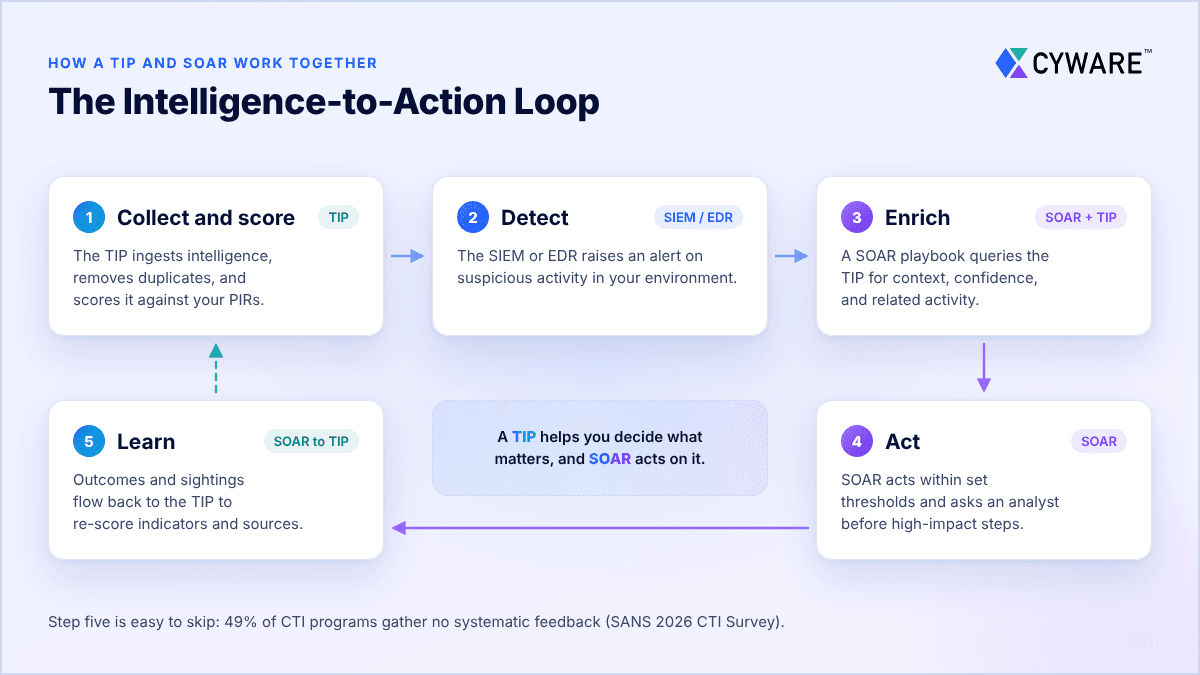
Step five is easy to skip, and many programs do. The SANS 2026 CTI Survey found that 49% gather no systematic feedback on CTI effectiveness. Without that feedback, the TIP learns little about which intelligence worked.
For example, a SIEM flags an outbound connection to an unfamiliar domain. A SOAR playbook automatically asks the TIP what it knows about that domain. The TIP links the domain to a known phishing kit with high confidence.
SOAR blocks the domain, isolates the host, and opens a case for an analyst. After the analyst confirms the incident, the sighting raises the domain's score across connected tools. That is the loop working.
Common Use Cases
Phishing triage: SOAR extracts URLs, domains, and attachments from a reported email. The TIP returns reputation and context, and SOAR quarantines matching messages.
Indicator blocking with guardrails: SOAR blocks indicators only above a confidence threshold. The TIP supplies expiry dates and allowlists for shared infrastructure, such as CDNs.
Vulnerability prioritization: The TIP flags CVEs listed in the CISA Known Exploited Vulnerabilities (KEV) catalog. SOAR then opens prioritized patch tickets for the affected assets and owners.
Detection engineering: Intelligence mapped to MITRE ATT&CK helps engineers write Sigma or YARA rules. SOAR can push approved rules to security tools and track how often they fire.
Community sharing: When a case confirms a new indicator, SOAR returns it to the TIP. The TIP then shares it with ISAC peers under the right TLP marking.
TIP vs. SOAR vs. SIEM vs. XDR vs. AI SOC Agents
Buyers often weigh TIP and SOAR against three other tools that answer different questions.
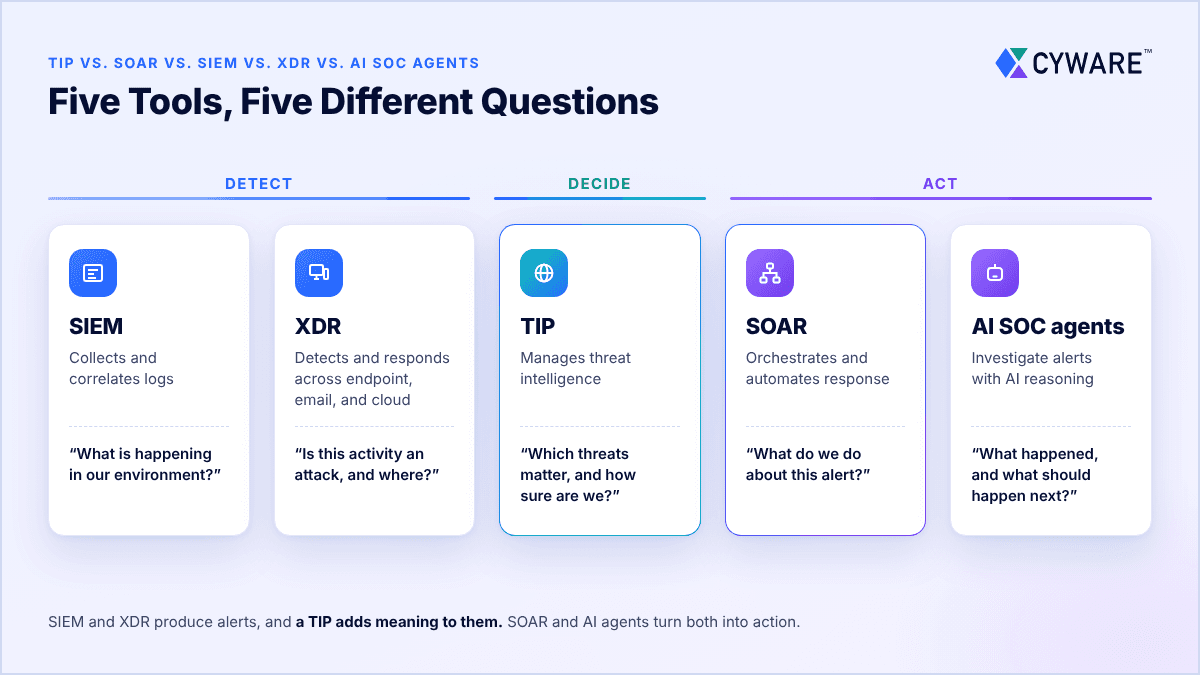
Tool | Core Job | Question It Answers | Typical Owner |
SIEM | Collects and correlates logs | What is happening in our environment? | SOC, detection engineering |
XDR | Detects and responds across endpoint, email, and cloud | Is this activity an attack, and where? | SOC |
TIP | Manages threat intelligence | Which threats matter, and how sure are we? | CTI team |
SOAR | Orchestrates and automates response | What do we do about this alert? | SOC, incident response |
AI SOC agents | Investigate alerts with AI reasoning | What happened, and what should happen next? | SOC, with analyst oversight |
SIEM and XDR produce alerts, and a TIP adds meaning to them. SOAR and AI agents turn both into action.
Do You Need Both? A Decision Framework
The answer depends on your bottleneck, so treat these profiles as a starting point.
Team Profile | Typical Bottleneck | Usual Starting Point |
Small SOC, a few analysts | Alert volume and limited time | SIEM or XDR with built-in intelligence |
Mid-size enterprise SOC | Repeatable alert handling | SOAR first, then a TIP as feeds grow |
Mature CTI program | Relevance and sharing at scale | TIP first, connected to SOAR |
MSSP or MDR provider | Many clients and many feeds | Both, with multi-tenancy |
ISAC, ISAO, or CERT | Sharing with members | TIP-centered sharing hub with automation |
Regulated sectors (DORA, NIS2) | Information sharing and audit trails | Both, with clear governance |
No profile fits every team perfectly. Beyond team size and volume, these criteria show which tool will pay off first:
Operational complexity: Count your alert types, tools, and handoffs between teams. Many repeatable steps across many tools favor SOAR.
Intelligence complexity: Count your feeds, sources, and PIRs. Many sources of uneven quality favor a TIP.
Integration requirements: List the tools each platform must read from and write to. One-way lookups suit SOAR with enrichment services, while two-way partner exchange favors a TIP.
Governance maturity: Check for documented processes, approval rules, and audit logs. Weak governance argues for limited automation until those controls exist.
Sharing obligations: ISAC membership, subsidiaries, or regulatory duties favor TIP-native sharing.
Measurable business value: Define the metric each tool must move, such as response time. If you cannot baseline that metric today, start there.
When You Do Not Need a Dedicated TIP
A separate TIP is not always the right first step. You may not need one in these cases:
Built-in intelligence: Your SIEM or XDR may already cover your needs. Microsoft now includes Defender Threat Intelligence in Defender XDR and Sentinel at no additional cost. The standalone MDTI product was retired on August 1, 2026.
Managed intelligence: An MDR provider may handle intelligence if you have no CTI analysts in-house.
Low volume: SOAR can call enrichment services such as VirusTotal directly. The trade-off is no scoring history, no source tracking, and no sharing.
Tight budget: Open source platforms such as MISP and OpenCTI can fill the gap. Running them well still takes skilled staff and ongoing engineering time.
If you have CTI analysts doing CTI work, though, you will usually need a TIP.
When You Do Not Need SOAR Yet
Your processes are not documented: Automating an undefined process tends to make mistakes faster.
Your alert volume is manageable: Built-in SIEM or XDR automation may be enough for now.
You lack engineering time: Playbooks need people to build, test, and maintain them.
When You Need Both
You ingest many feeds and must score them against your PIRs.
You regularly share intelligence with partners, members, subsidiaries, or industry groups.
You handle enough repeatable alerts to justify building and maintaining playbooks.
You want AI agents to act on intelligence you can trust.
Start with a TIP if: intelligence volume and relevance are your main bottleneck.
Start with SOAR if: repeatable alert handling is your main bottleneck.
Plan for both if: you share intelligence and automate response at scale. A unified platform that does both jobs is also worth considering.
Is SOAR Being Replaced by AI SOC Agents?
SOAR is in the middle of a loud public debate about its future. Before weighing in, give classic SOAR its due.
Classic SOAR: Playbooks are deterministic, so the same input produces the same action every time. They are easy to audit, they fit change control, and they integrate with many security tools. The limits are real too. Engineers must write, test, and maintain each playbook by hand, and novel alerts fall outside them.
AI SOC agents: Agents reason through each investigation instead of following fixed steps. They adapt as new evidence appears. Gartner's Innovation Insight: AI SOC Agents (October 2025) frames them as tools that augment SOC tasks. The trade-off is predictability, since the same alert may not produce the same path twice.
Adoption is already broad, according to IBM's 2026 Cost of a Data Breach Report. More than half of the breached organizations it studied use AI agents for detection and containment.
Agents bring new risks of their own. Their answers can sound confident without always being accurate. Poisoned inputs can also steer them through prompt injection. Over-broad permissions can turn a poor decision into a harmful action.
OWASP's Top 10 for Agentic Applications names goal hijacking and tool misuse as top risks. CISA and NSA's 2026 guide, Careful Adoption of Agentic AI Services, recommends human checkpoints before high-impact actions.
Vendors disagree on what this means for SOAR. Some AI SOC vendors describe SOAR as obsolete, while incumbents are rebuilding their platforms around agents. In October 2025, Palo Alto Networks introduced Cortex AgentiX as the next generation of Cortex XSOAR.
The practical answer sits in between: fixed playbooks still suit high-volume, well-understood tasks. Agents suit messy, novel investigations that do not fit a predefined script. A common pattern pairs them, with agents proposing and playbooks executing approved actions.
One thing does not change: agents still need trusted, scored, and current intelligence. An agent reasoning over a stale or noisy feed can reach inaccurate conclusions faster.
In practice, the TIP becomes the grounding layer that agents rely on for context. It tells an agent which sources to trust and how old each indicator is. It also shows which actors target your sector and which techniques they use.
Agents do not remove the need for intelligence. They raise the cost of bad intelligence.
To see how AI is changing the TIP, read our AI vs. traditional TIP comparison.
How to Evaluate TIP and SOAR Together
Whether you buy one platform or two, test the connection as carefully as each product.
Some platforms combine both jobs. Cyware approaches this through a model it calls Unified Threat Intelligence Management. It connects intelligence management, sharing, and orchestrated action in one place.
That does not make a unified platform automatically better than a well-integrated TIP and SOAR pair. Either way, define PIRs, confidence thresholds, and approval rules before scaling automation. Then test these points:
Test both directions: Confirm SOAR can query the TIP and outcomes flow back as sightings.
Check standards support: Look for STIX 2.1 and TAXII 2.1 support for partner and tool exchange.
Measure lookup speed: Playbooks call the TIP often. Slow lookups quickly stall automation when alert volumes rise.
Inspect indicator guardrails: Confirm confidence scores, expiry dates, and allowlists for shared infrastructure.
Require approval gates: Automated and agent actions above a set risk level need human approval.
Plan for multi-tenancy: MSSPs and ISACs need separate data and controls per client or member.
Count the full cost: Include feed licenses, playbook engineering, maintenance, and integration upkeep.
How to Prove the ROI of a TIP and SOAR
A TIP and SOAR should prove their value with numbers, not demos. Many programs lack the baseline to do that. The SANS 2026 CTI Survey found that 57% of programs do not track maturity over time.
The wider business case is easier to see. IBM's 2026 Cost of a Data Breach Report puts the average breach at $4.99 million. Extensive users of security AI and automation saved $1.93 million on average versus organizations using none.
That figure covers security operations broadly, not TIP or SOAR alone. Your own baseline is the stronger proof. Capture these metrics before you buy, then track them through the pilot:
Analyst hours per alert type: Pull handling time from SOAR or ticketing case records.
MTTR: Use case timestamps from alert creation to containment.
Advisory-to-action time: Measure the time from a new advisory to a block, hunt, or patch ticket.
False-positive rate on intel-driven blocks: Compare TIP-driven blocks with analyst reversals.
Intel-driven detections: Tag SIEM rules and alerts with their TIP source, then count true positives.
PIR coverage: Report how many PIRs received relevant intelligence each week.
Feed value: Compare sightings and true positives per feed with that feed's cost.
Automation rate: Count playbook runs that finished without manual steps.
AI override rate: Track how often analysts reject or change an agent's recommendation.
Analyst hours, MTTR, and automation rate mostly reflect SOAR. PIR coverage, feed value, and intel-driven detections mostly reflect the TIP. Report two or three from each group every quarter, tied to risks leadership already tracks.
How to Add a TIP or SOAR to Your Stack
Adding the missing piece is an integration project as much as a purchase. Treat it like any enterprise software decision, and design the integration from day one.
Phase 1: Audit What You Have
Map current intelligence and automation use: List every feed, enrichment service, playbook, and sharing partner. Note which steps run automatically and which still need an analyst.
Score built-in capabilities honestly: Check what your SIEM, XDR, or SOAR already does with intelligence. A gap you can close with configuration does not need a new platform.
Check contract timing: Note end dates, notice periods, and export rights for tools and feeds.
Capture a baseline: Record the ROI metrics above for at least one month.
Phase 2: Build the Business Case and Requirements
Bring stakeholders in early: Involve the SOC, CTI, incident response, procurement, legal, and privacy teams. Each has approvals that surface late if ignored.
Refresh your PIRs: Confirm the questions intelligence must answer, then rank them. They become scoring logic and acceptance tests for the new tool.
Define the integration contract: Decide which playbooks query the TIP and which fields they need. Agree on which outcomes flow back as sightings.
Set automation and AI policy: Decide which actions may run unattended and which need approval. The NIST AI Risk Management Framework gives AI decisions a structure.
Phase 3: Run a Proof of Value
Script the same scenarios for every vendor: Use your own alerts, feeds, and reports. Good scenarios include phishing triage, a new CISA advisory, and sharing a confirmed indicator.
Test both directions: Confirm SOAR can query the TIP at full alert volume. Then confirm that sightings flow back to the TIP. Check TAXII 2.1 and TLP support for partners.
Test failure handling: Check what a playbook does when the TIP is slow or unavailable. A safe default is to enrich later rather than block blindly.
Review security and agent controls: Confirm data residency, least-privilege access, audit logs, and per-action approvals. CISA's Secure by Demand Guide lists questions to ask software vendors.
Negotiate the transition: Secure an overlap period, export terms, and integration support in the contract.
Phase 4: Migrate Data and Connect the Tools
Move only useful intelligence: Import active, high-confidence indicators, actor profiles, and sighting history. Archive expired indicators rather than importing years of noise.
Preserve context: Export in STIX 2.1 so confidence, TLP markings, and sources survive the move.
Rebuild enrichment: Replace direct lookups in playbooks with TIP queries. Start with phishing and indicator blocking. Keep the old enrichment as a fallback during testing.
Set guardrails before blocking: Add confidence thresholds, expiry dates, and allowlists for shared infrastructure.
Phase 5: Pilot, Cut Over, and Retire
Run in parallel: Start with read-only enrichment and compare results with the old process. Use the same alerts for both.
Expand by risk: Turn on low-risk actions first, then blocking and containment with approval gates. Keep a rollback path for each one.
Repoint sharing partners: Give ISACs and peers any new TAXII endpoints and confirm collections sync.
Train and retire: Train analysts to review automated output and get sign-off from owners. Then retire replaced tools and revoke their API keys.
Not sure which capabilities to prioritize? Our Threat Intelligence Platform Buyer's Guide covers the features, questions, and trade-offs to weigh.
Final Thoughts: Which Should Come First?
A TIP and SOAR solve different problems in the same security operations loop. The TIP helps you decide what matters. SOAR acts on that decision quickly and consistently, at scale.
Start with the bottleneck that hurts your team most today. If relevance is the problem, start with intelligence. If repeatable work is the problem, start with automation.
Then connect the two, because the value sits in the loop between them. The goal is not more alerts or more feeds. It is faster, better-informed security decisions.
Want to see how intelligence and automation connect in practice? Talk to a threat intelligence expert.
Frequently Asked Questions
What is the difference between a TIP and SOAR?
A TIP manages threat intelligence by collecting, normalizing, scoring, and sharing threat data. SOAR manages response by connecting security tools and running playbooks that triage and contain alerts. A TIP helps you decide what matters, and SOAR acts on it. Mature SOCs usually need both capabilities working together.
Do I need a TIP if I already have SOAR?
It depends on how much intelligence you manage and share. At low volume, SOAR can call enrichment services such as VirusTotal directly. That may be enough.
A TIP becomes necessary when you manage many feeds, track PIRs, or share with partners. It adds what direct lookups lack: source scoring, history, deduplication, and TLP-aware sharing. If you have CTI analysts doing CTI work, you will usually need a TIP.
Can SOAR replace a threat intelligence platform?
Partly. Many SOAR tools include threat intelligence modules, and Gartner's SOAR definition includes intelligence management. These modules work well for quick indicator lookups inside playbooks.
They rarely match a dedicated TIP for source scoring, strategic intelligence, analyst workflows, or community sharing. Test the module against your PIRs and sharing needs before you rely on it alone.
Can a TIP automate response without SOAR?
Yes, for some actions. Many TIPs push vetted indicators to SIEMs, firewalls, and EDR tools through built-in integrations. Some also run rule-based playbooks for repeatable steps, such as blocking high-confidence indicators.
The limits appear in multi-step incident response. A TIP rarely offers full case management, cross-team task tracking, or deep ticketing integrations. If response work spans many tools and teams, SOAR or a unified platform fills that gap.
Can I keep my existing SOAR when I add a TIP?
Yes, in most cases. A TIP and SOAR usually connect through APIs, so your playbooks can stay in place. You add TIP lookups to existing enrichment steps and send case outcomes back as sightings.
Before you start, confirm a maintained integration in both directions and acceptable lookup speed. Also agree on who owns the shared scoring rules.
How do I prove the ROI of a TIP and SOAR?
Start with a baseline, then track a few operational metrics. Useful ones include analyst hours per alert type, advisory-to-action time, false-positive rate, and intel-driven detections.
Industry data can frame the case. IBM's 2026 Cost of a Data Breach Report found average savings of $1.93 million. Those savings came from extensive use of security AI and automation. That figure covers more than TIP and SOAR, so pair it with your own numbers.
What is the main difference between SIEM and SOAR?
SIEM collects and correlates logs to detect suspicious activity. SOAR takes the alerts a SIEM produces and automates the response. In short, SIEM finds the problem and SOAR helps fix it. Many teams add a TIP to give both tools better context.
Does SOAR replace SIEM?
No. SOAR depends on detection tools, such as a SIEM or XDR, to generate alerts. It does not collect and analyze logs at the same depth. Some platforms bundle SIEM and SOAR, but the two jobs remain distinct.
What are examples of SOAR tools?
Common options include:
Splunk SOAR: Part of Cisco since Cisco completed its Splunk acquisition in March 2024.
Cortex XSOAR and Cortex AgentiX: AgentiX, launched in October 2025, is the next generation of XSOAR.
Google Security Operations SOAR: Built on Siemplify, which Google acquired in January 2022.
Microsoft Sentinel playbooks: Sentinel playbooks are workflows built in Azure Logic Apps.
Swimlane Turbine and Torq AI SOC Platform: Both appear in the Gartner Peer Insights SOAR market.
Test any shortlist with a scripted proof of value on your own alerts. For the intelligence side, see our guide to the top threat intelligence platforms.
What is the difference between a threat intelligence feed and a TIP?
A threat intelligence feed is a stream of threat data from one source. Examples include malicious IP addresses, phishing domains, or malware file hashes, often delivered over TAXII 2.1.
A TIP ingests many feeds, removes duplicates, scores each source, and adds actor and technique context. The feed supplies data. The TIP helps analysts determine what that data means and where it should go.
About the Author